
The widget isn’t showing on my store
Nearly every case is one of five things. Work down the list. Each takes under a minute to check.
1. Is the app enabled?
Open the app’s dashboard. The status card at the top should read Enabled, with “Your booking widget is live on your storefront.” If it says disabled, click Enable.

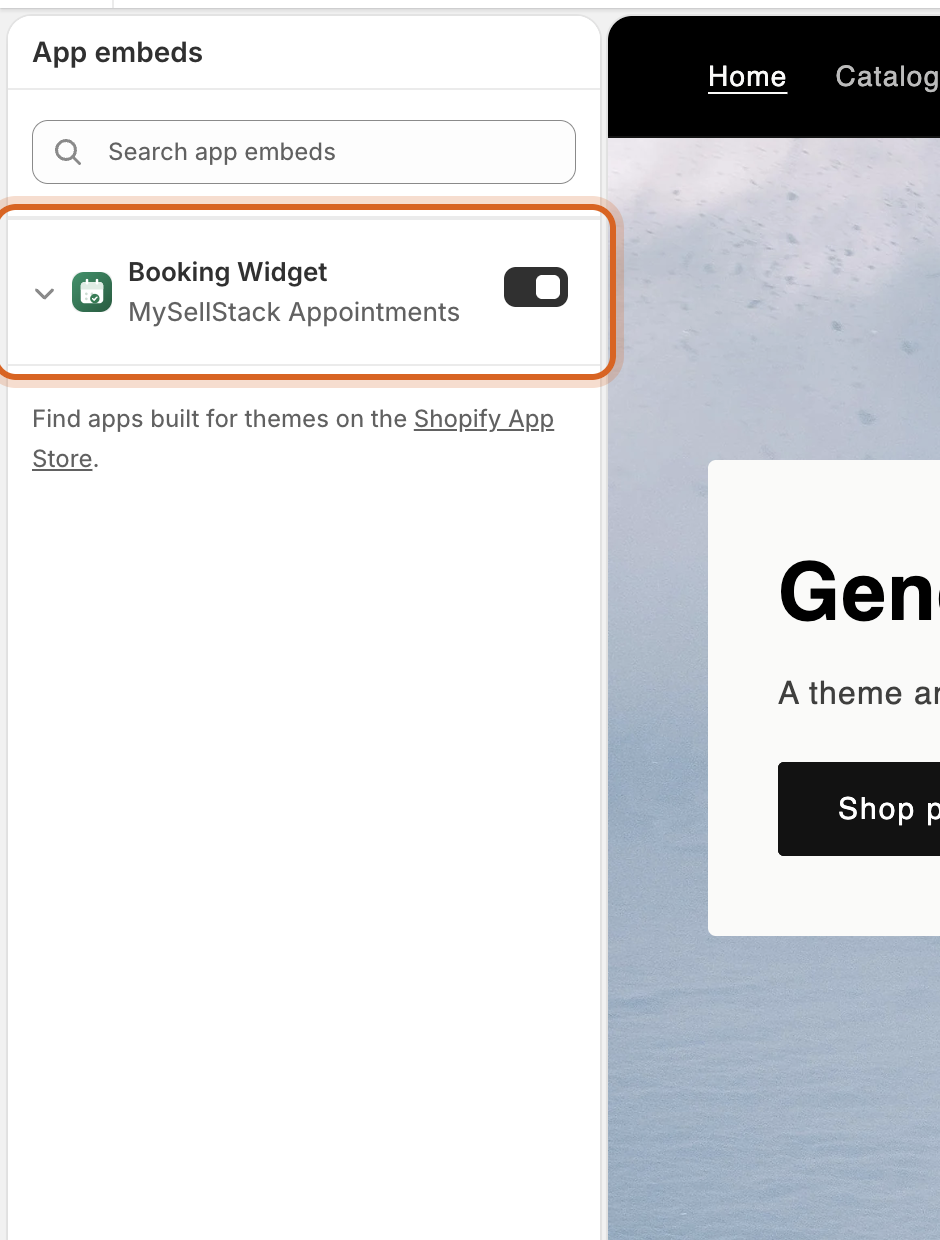
2. Is the app embed on in your theme?
In Online Store → Themes → Customize, open App embeds and check Booking Widget by MySellStack Appointments is toggled on, and that you clicked Save. An unsaved theme editor is the single most common cause.
3. Is this product actually a service?
The Book now button appears only on the product pages the app creates for your services. A product you created by hand in Shopify isn’t bookable. Services create and own their products. Check the service exists under Services and has been saved since your latest changes.
4. Are you looking at the right page?
The pop-up widget replaces the cart button on the service’s product page. An inline calendar or services directory appears only where you placed that app block in the theme editor.
5. Hard refresh
Theme edits and app changes can hide behind your browser’s cache. Reload
with Cmd/Ctrl + Shift + R, or try a private
window.
Still not showing?
Send us a message with your
.myshopify.com domain and a link to the product page. We’ll
take a look ourselves, usually within a business day.